Enterprise SaaS Concept · Full-Stack Product Design
Role: Lead Designer & Builder
Industry: Philanthropy · Grant Management
Domain: Grants Admin · Financial Operations
Built with: Claude AI · React · TypeScript · 2026
The Brief
Every dollar in one of four states. Always reconciled.
The challenge came from a real enterprise with a real problem. A foundation managing multi-year grant commitments — each running 3–5 years, totaling tens of millions of dollars — was tracking everything across spreadsheets, PDF amendments, and an aging internal tool. Program officers were re-keying numbers. Finance analysts couldn't verify payment conditions before a release ran. Compliance leads had no immutable audit trail.
No single source of truth — budget state, payment schedule, and amendment history lived in three different places.
Conditions slipped undetected — overdue gates weren't surfaced until the next reconciliation cycle, sometimes weeks later.
No role separation — anyone could see or action anything, creating compliance exposure.
The ask: a Budget Modeler where budget changes are visible in the payment schedule and payment status is visible in the budget. The constraint that made it hard — a grant dollar can only exist in one of four states, and they must always reconcile:

Design the wrong visual model and the math becomes invisible. Design the right one and the system enforces integrity on its own. I delivered the Figma design within the 72-hour submission window — then decided to keep building.
The Architecture Decision
The data model came first. Everything else followed.
Before opening Figma, I mapped the full system: three user roles, seven payment lifecycle states, and the reconciliation rule that had to hold at every state transition. The data model was the design. Everything else followed from it.
The Visualization Call
Stacked bar over Sankey, waterfall, or table
The brief asked me to defend my visualization choice. Sankey diagrams show flow — but operations users need to see current state, not movement. Waterfall charts show changes over time — wrong frame for a tool where the snapshot matters. A table is precise but can't show proportion at a glance.
The stacked bar won on three counts: it shows proportion and composition simultaneously, encodes locked vs. mutable state through color without a legend, and scales from portfolio level to single-grant level with no change in mental model. Scannable in under a second.
Role Architecture
One product. two permission tiers. No separate interfaces.
Three roles: Bernadette Okafor (Program Officer — full read/write, manages grants and amendments), Shubah Krishnamurthy (Finance Analyst — approves and releases payments, cannot amend grant terms), and Devon Castillo (Compliance Lead — read-only, full audit trail access, no payment actions). Rather than designing three separate tools, I designed one product with role-based surface variation. Every action component carries a permission check against a single role matrix. Consistent access control by construction, not by convention.
Responsive Strategy
Tablet-first for working. Mobile for reporting.
A data-heavy financial tool doesn't collapse gracefully to mobile. Rather than bolt on a compromised experience, I made a deliberate product decision: desktop and tablet carry the full application, mobile becomes a lightweight read-only executive dashboard.
Desktop 1200px+
Full application
Grant management, payment scheduling, amendments, portfolio administration, and reporting. Everything available.
Tablet 768–1199px
Full application, adapted layouts
Create grants, approve payments, manage schedules, review amendments. Tables scroll horizontally. Modals become full-screen sheets.
Mobile <768px
Read-only dashboard
View portfolio health, check grant status, review payment schedules, search grants, see upcoming deadlines. No write actions.
The data model became the source of truth. The UI was designed to make that model legible — not to paper over its complexity.
The Experience
Design as direction, AI as implementation
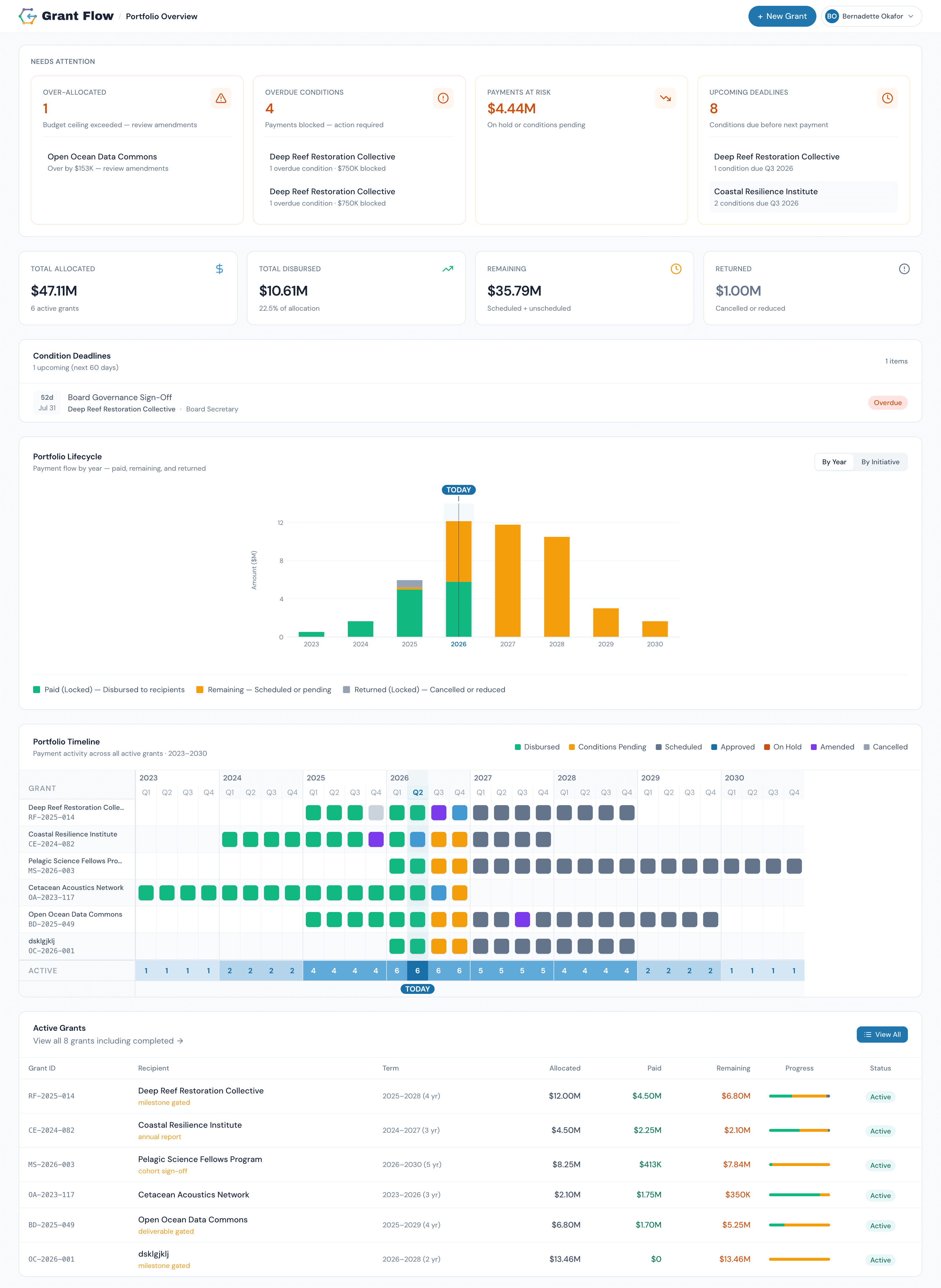
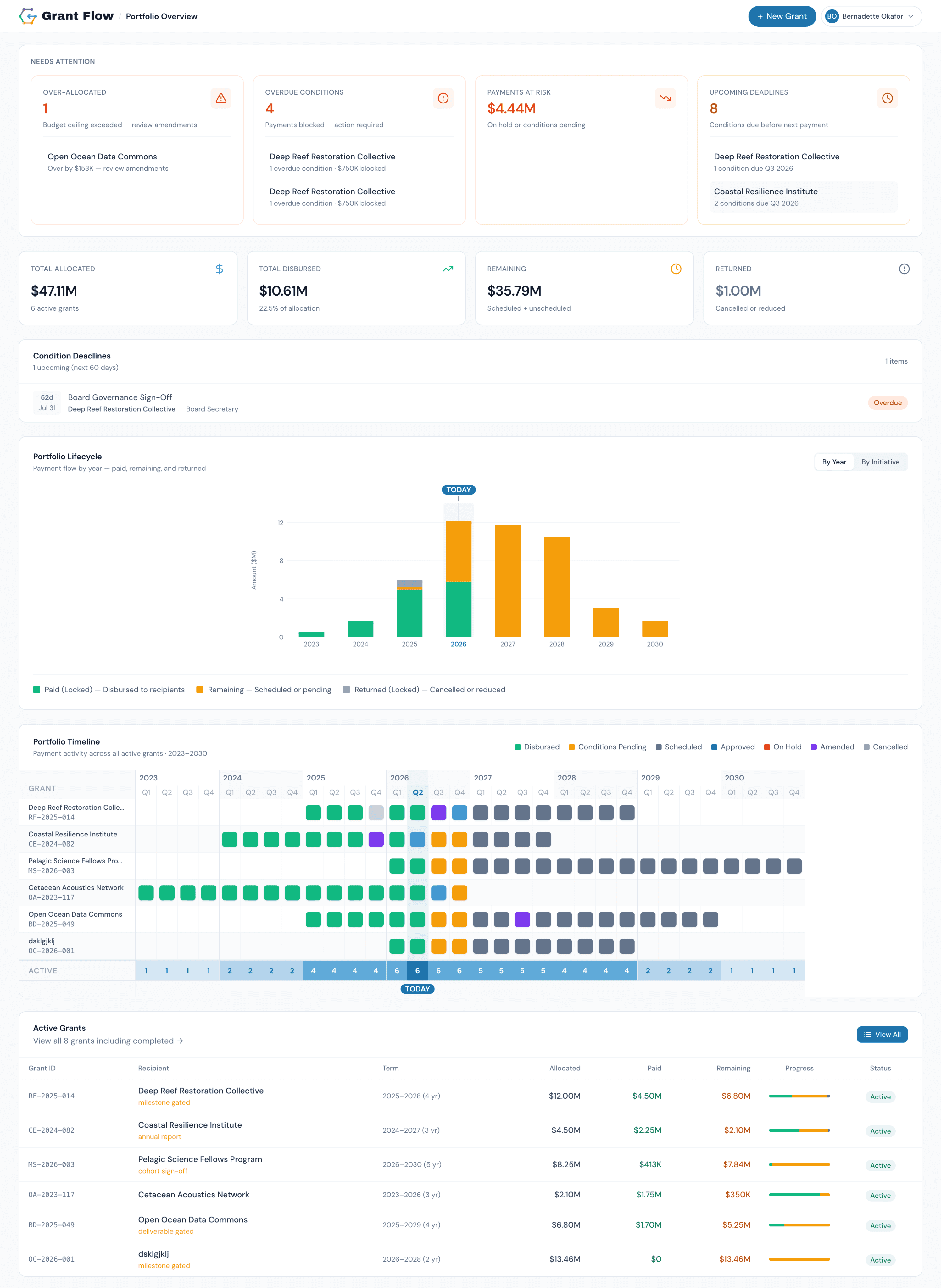
Portfolio Overview – Everything that needs attention. Immediately visible.
Total allocated, paid, remaining, and returned across all active grants. Overdue conditions, over-allocated grants, and upcoming payment deadlines surfaced without drill-down. The portfolio lifecycle chart shows cash flow across all grants — switching roles changes what actions are available without changing the data model.
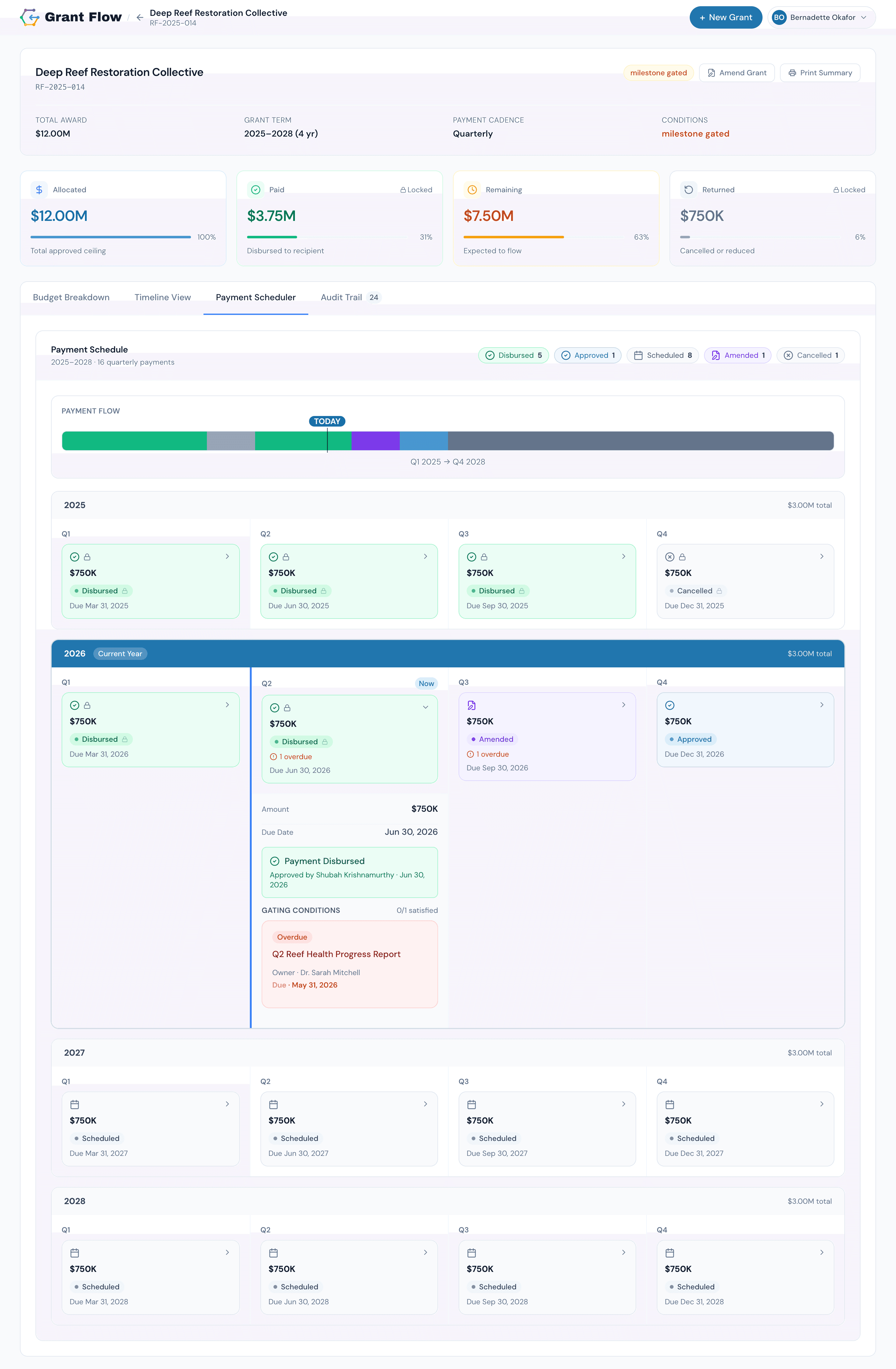
Payment Scheduler – Seven lifecycle states. Every payment. One timeline.
Every payment across the full multi-year term in a scrollable timeline anchored to the current quarter. Each card shows lifecycle state, amount, conditions, and only the actions the active role can take. Re-forecasting a payment — push, split, reduce, cancel — updates the budget state cards in real time.
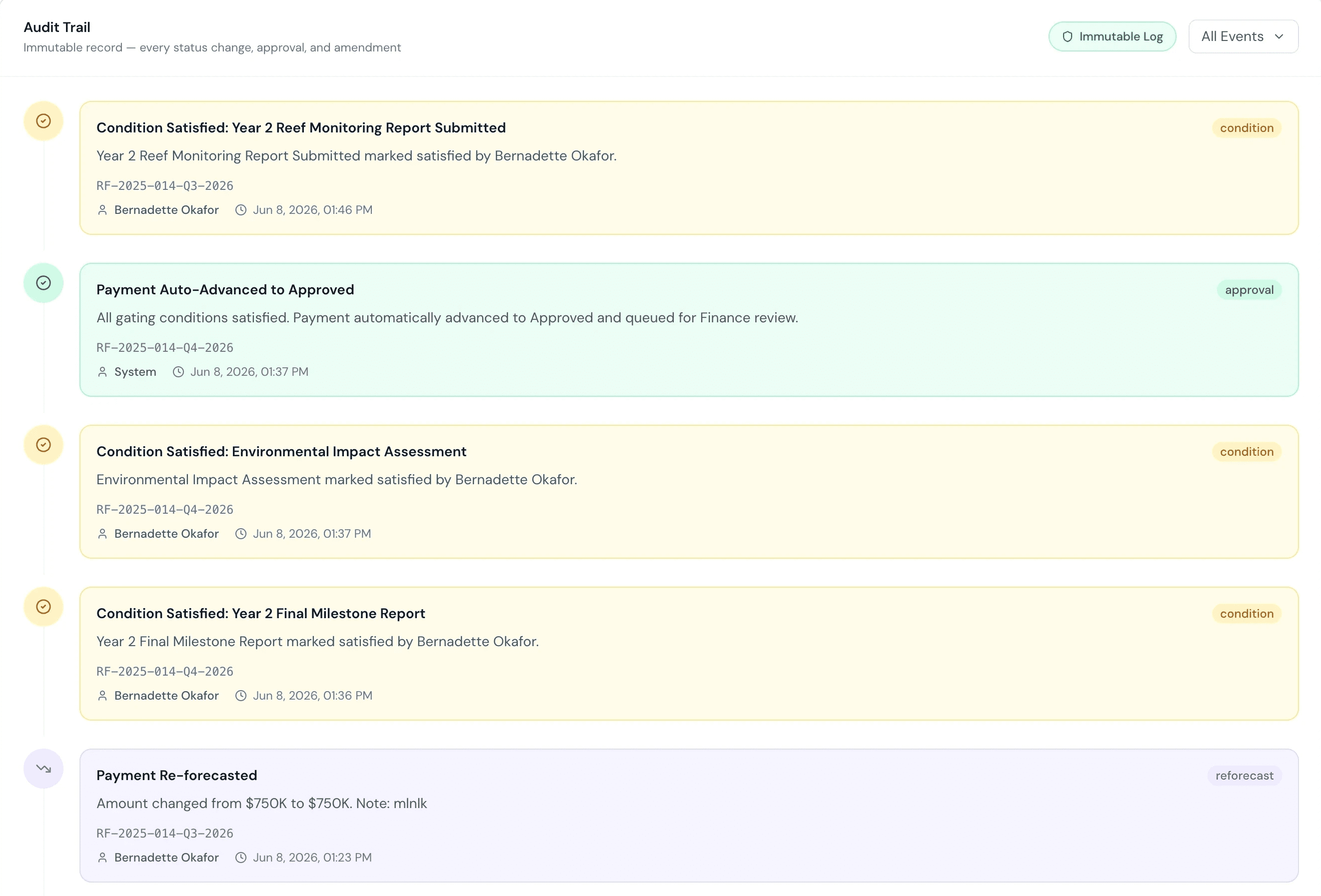
Grant Detail + Audit Trail – The financial model and its full history in one view.
Four budget state cards show the current snapshot. The reconciliation bar visualises Paid / Remaining / Returned against Allocated — and flags a live discrepancy the moment it appears. The audit trail is an append-only log attributed to user, role, and timestamp. Amendment history surfaces inline within the payment record it affects — context never separated from action.
A grant dollar can only exist in one place at once. Designing the system that enforces that truth made everything else tractable.
Built with AI · Claude-powered development
I held the strategy. Claude held the execution velocity.
I built GrantFlow in direct collaboration with Claude AI — treating it as an implementation partner, not a generator. Before writing a line of code, I had the data model mapped, the role permission matrix defined, and the edge cases documented. Claude's job was to build what I had already specified.
Claude stress-tested edge cases in the data model, surfacing the over-allocation scenario — an amendment increasing allocation after payments are already in flight — that became an explicit design requirement. It scaffolded component structure, generated realistic mock data at scale, and drafted error and empty states. What it couldn't do: decide what to scope, choose the stacked bar over the waterfall, or determine that the compliance lead needs read-only access to the audit trail but no payment actions. Those decisions require understanding the domain. That's the design work.
The discipline of working this way changes where ambiguity surfaces — not in a sprint review, but in the brief. Gaps in the spec became visible before they became bugs. That's the real productivity gain: not faster typing, but clearer thinking made executable.
1
Tool replacing 3 disconnected systems — spreadsheets, PDF amendments, legacy tracker
3
User roles with distinct permission tiers, built into one product
~0
Manual reconciliation errors — the four-state model enforces accuracy continuously
Reflection
A 2-hour brief. A week's worth of building.
What began as a 2-hour enterprise design challenge became a fully realized product. I delivered the Figma design within the submission deadline — then kept building, because the problem had more in it. The result demonstrates how I actually work: understand the system before designing the screens, get the data model right before touching components, and let every visual decision trace back to a product principle.
The four-state reconciliation model — Paid, Remaining, Returned, Allocated — is the spine of the entire product. Getting it right upfront is what made every downstream decision clear: which visualization to use, how to structure role permissions, when to surface a discrepancy, what an amendment should cost the budget. A well-understood constraint is not a limitation. It's the foundation the product is built on.